
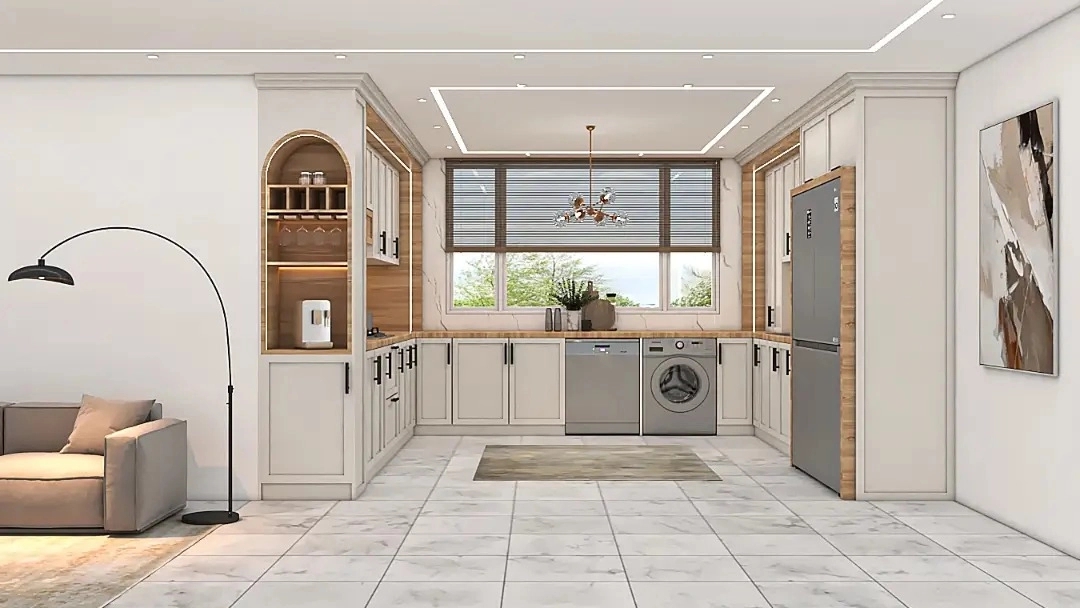
The industry of interior design, especially in the field of cabinet making, has always sought innovation and the use of powerful tools to create functional works of art. Membran cabinets, with their stunning beauty, variety of design and high resistance, have found a special place in kitchens and modern spaces. But creating unique designs and their precise implementation requires mastery of specialized software. In the meantime, ADEKO software, as one of the most advanced and comprehensive tools for interior designers, provides the possibility of implementing creative ideas in the design of membrane cabinets.
Why ADEKO? The power of software in membrane cabinet design
Before entering into the details of the training, it is necessary to know why ADEKO software is known as a powerful tool for membrane cabinet design. ADEKO is a specialized software in the field of interior and cabinet design that, with its unique capabilities, makes the design process simpler, faster and more accurate from the idea stage to the final implementation.
- Realistic 3D environment: ADEKO allows you to view your designs in a highly detailed 3D environment. This feature provides a better understanding of the dimensions, proportions and final appearance of the cabinets and helps you to fix any problems before starting construction. Extensive libraries: This software has comprehensive libraries of various cabinet models, fittings, handles and different materials. This accelerates the process of selecting and placing components and provides access to a wide range of ready-made designs and standard templates.
- Detailed simulation: ADEKO is able to simulate precise details such as the opening and closing of doors, drawers and the placement of fittings. This feature is very useful, especially in the design of membrane cabinets, where executive details are of great importance.
- Automatic production of executive drawings: One of the biggest advantages of ADEKO is its ability to automatically generate two-dimensional and three-dimensional drawings, cutting lists, and even CNC drawings. This feature greatly reduces the time required for the preparation of executive documents and prevents measurement and cutting errors.
- High Customizability: With ready-made libraries, ADEKO offers high flexibility in customizing designs. You can change the dimensions, designs, colors and materials according to the customer's needs and your design style.
With these features in mind, it's clear why ADEKO Interior Design has become an essential tool for any professional cabinet designer.
Step by step with ADEKO: membrane cabinet design from start to finish
Now that we are familiar with the importance and capabilities of ADEKO, let's go to the practical steps of designing membrane cabinets with this software.
First step: Project setup and initial settings
- Creating a new project: After running the ADEKO software, the first step is to create a new project. In this step, you need to enter the general information of the project, such as the name of the client, the general dimensions of the space and the measurement units.
- Definition of the space plan: In this step, you need to draw the two-dimensional plan of the desired space with exact dimensions. You can place walls, windows, doors and other fixed elements of the space at this stage. Accuracy in drawing the plan is the basis of a correct design.
- Material and color settings: Before starting the design of the cabinets, it is better to define the main materials and colors that you intend to use in the software. ADEKO also provides the possibility of importing customized materials, which is very useful for membrane cabinets with various designs and covers.
Second stage: designing cabinets and placing components
- Cabinet model selection: ADEKO provides you with a set of standard cabinet models. You can choose the desired model based on the needs of the project (floor cabinet, wall cabinet, column). For membrane cabinets, it is important to focus on models with prominent and patterned doors.
- Determination of dimensions and sizes: After choosing the model, it is time to determine the exact dimensions of each cabinet. Enter the height, width, depth and thickness of the cabinet components based on the space plan and design standards.
- Placement of cabinets in space: Place the designed cabinets in the 3D space based on the plan and exact location. In this step, pay attention to the overall layout of the kitchen, the access to the components and the proportion of the cabinets to the dimensions of the space.
- Adding interior components: In this step, add shelves, dividers, baskets and other interior cabinet equipment. ADEKO provides the possibility of accurate simulation of these components.
- Selecting and placing fittings: Select handles, hinges, rails and other fittings and place them in their proper place. The variety of fittings in ADEKO helps you to implement the exact details of the design.
Third step: details of members and final payment
- Door and facade design: For membrane cabinets, the precise design of the doors is of particular importance. At ADEKO, you can apply your desired embossed and CNC designs on the doors. This software also has the possibility to import CNC design files.
- Application of material and final color: Apply the desired membrane cover with the desired color and design to the doors and facade of the cabinets. Use the 3D preview feature to see exactly what the final look will look like.
- Add decorative details: If needed, add decorative details such as crowns, lampshades, decorative columns, and cornices to the design.
- Check and optimize: After the design is complete, check the entire project from different angles. Ensure that there is no interference between components, proportionality of dimensions and beauty of the design. If necessary, make the necessary corrections.
Fourth step: production of output and execution plans
- Producing 3D renderings: Using ADEKO's internal rendering engine, create high-quality 3D images of your design. These images are very effective for presenting to the client and showing the final appearance of the project.
- Preparation of 2D and 3D drawings: ADEKO automatically produces 2D drawings (plan, elevation, section) and 3D drawings. These drawings are essential for manufacturing workshops and installers.
- Production of cutting list and CNC information: This software can produce detailed cutting list of cabinet parts as well as necessary files for CNC machines. This capability guarantees accuracy in production and reduction of waste.
Professional tips for membrane cabinet design at ADEKO
To achieve more professional results in the design of membrane cabinets with ADEKO, pay attention to the following points:
- Focus on details: Membran cabinet owes its beauty to details. Be careful in using CNC designs, cornices, crowns and handles and try to create a perfect harmony between them.
- Choosing the right material and color: Membrane cover is available in many different colors and designs. According to the general style of interior decoration, choose the best combination of color and design. Light colors make the space look bigger and dark colors create a sense of luxury.
- Using lighting: proper lighting can double the beauty of membrane cabinets. Make proper use of hidden lights under cabinets, inside shelves, and above cabinets. ADEKO also has the possibility of simulating light.
- Consider the use of the space: the design of the membrane cabinet is not only limited to beauty, but must be practical and fit the needs of the residents. Pay attention to how to access the components, enough space for accessories and ease of cleaning.
- Cooperation with the manufacturing workshop: During the design process, be in contact with the manufacturing workshop to learn about their limitations and implementation possibilities. This coordination prevents problems in the production phase.
- Continuous update: ADEKO software is regularly updated and new features are added to it. Always install the latest version of the software and familiarize yourself with its new features.
Conclusion: Creating masterpieces of membrane cabinets with ADEKO
ADEKO software is a powerful and essential tool for any interior designer who intends to work in the field of membrane cabinet design. By mastering the capabilities of this software, you can create creative, beautiful and functional designs and present your projects with the highest professional level. From the realistic 3D environment and extensive libraries to the automatic generation of execution drawings, ADEKO provides you with all the necessary tools to make the design process an enjoyable and efficient experience.
Are you ready to transform your membrane cabinet design skills with advanced ADEKO software? Start learning with ADEKO interior design today and step into the world of creating stunning cabinet designs. For more information and access to specialized training resources, visit our website and take the first step towards becoming a professional!